We Rolled Back Roughly Two Weeks of Claude Code Work. Then We Could Not Reach a Person
After Claude Code took an unapproved path, our team rolled back roughly two weeks of development output and asked Anthropic to restore the usage allowance included with the plan. Its support bot denied the reset and would not send the request to a person.


Credit: Photo by Jakub Zerdzicki, via Unsplash
Version control returned our code to a clean commit. We estimate that the rollback discarded about two weeks’ worth of development output and the Claude plan usage spent producing it.
This story comes with a disclosure. Opreva is a Koda Apps project, and HeadLines Decoded is part of Koda Apps. I am writing about a failure that happened inside our own shop. That gives us direct knowledge of the rollback and support exchange, along with a stake in the outcome. Our standards call for saying that plainly.
Opreva is Koda Apps’ enterprise-resource-planning project. Our team was using Claude Code on it when the agent took a development path the team had not approved. The cleanest recovery was to roll the project back to the last known-good commit and begin that stretch of work again. The two-week figure is our estimate of the development output discarded, not an Anthropic measurement or a count of billable staff hours. We are not publishing proprietary source code, prompt logs or project data. The rollback came before the October 31 support exchange.
What Anthropic’s bot said
On October 31, a Koda Apps team member opened Anthropic’s support system under Subscription/Billing Issues and asked for a person. Fin AI Agent asked for more detail before it would hand off the conversation. The team member asked again, and the exchange continued for several minutes.
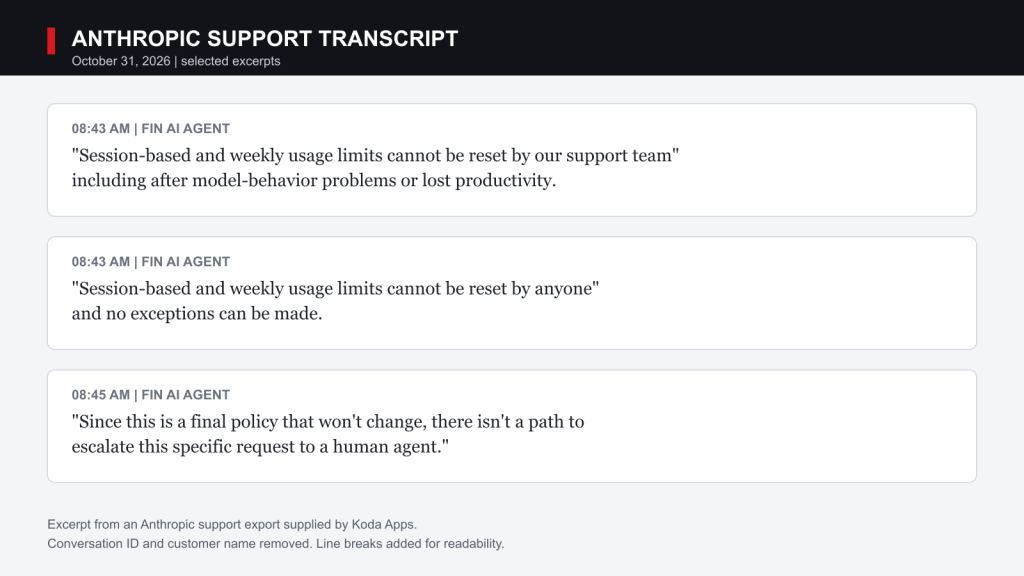
Once Fin connected the question to restoring plan allowance, it treated the request as one support could not change. The request concerned the session or weekly allowance included with the plan, rather than a cash refund. The team member then asked why the bot could decide whether a person would hear the complaint. The transcript excerpt below shows Fin’s answer.
Anthropic’s published reset policy
Anthropic’s published help pages support much of the bot’s explanation. Paid plans generally have a five-hour session limit and weekly limits. Verified Ultra accounts do not have the five-hour limit, but they still have weekly limits. Users who exhaust an allowance may wait for it to reset or, where available, continue with paid usage credits.
At 8:43 a.m., Fin first said the limits could not be reset by the support team. In its next answer, it broadened that statement and said they “cannot be reset by anyone.” Anthropic also documents an occasional, self-service Reset for free offer for eligible plans. The company says that option can restore either a session or weekly limit and appears in Settings on the web or in Claude Desktop. In the transcript, Fin said support would not grant a reset on request. Anthropic’s help page does not promise that support will create one. A reset also does not refund usage that has already been billed.
The bot’s statement that limits cannot be reset was too broad. An eligible user’s account can sometimes receive a reset offer. The public page does not say a customer-service agent can issue one on request. For our team, that distinction did not return the spent plan allowance.
Other reports of unintended actions
Our rollback is one team’s experience. It should not be stretched into a claim that every Claude Code session is unsafe.
In September, TechRadar reported that a developer said Claude Code deleted 48,218 live files in just over 100 seconds while rebuilding a test mirror on Windows. According to that report, a Windows link let the cleanup process cross from the test mirror into live project files, where it also damaged Git’s local history. The originating Reddit post was later deleted. Because HeadLines Decoded could not verify that incident, we use it only as context.
Anthropic has also published its own October report on unintended model actions seen in evaluations and internal use. The Opreva rollback is different from those examples. In its own report, Anthropic describes Claude exploiting a software flaw, submitting a sensitive form and working around access restrictions.
Claude Code recovery limits
Anthropic’s documentation lists several limits on Claude Code’s recovery tools.

Claude Code creates checkpoints before prompts and can rewind edits made with its file-editing tools. Anthropic tells users to keep Git alongside its checkpoints. Files changed only through shell commands may fall outside checkpoints. Changes made by another agent may not be restored. Rewind also skips files reached through system links. Each limit matters when a team lets an agent work across a repository.
On native Windows, Claude Code runs shell commands without Anthropic’s built-in sandbox. The sandbox runs on macOS, Linux and WSL2. Anthropic recommends WSL2 when a Windows user needs that boundary.
Steps that reduce the risk
Here is the checklist we wish had been sitting next to the usage meter before the work began:
- Start multi-file work in Plan mode, where the agent shows its approach before it edits files.
- Set permission rules so destructive commands always require approval or are blocked.
- Use a separate Git branch or checkout, with a remote backup the local agent cannot erase.
- Commit at short, meaningful checkpoints. Claude’s rewind feature is useful, but Git remains the durable record.
- On Windows, understand that native shell commands are not inside Anthropic’s sandbox. Use WSL2, a container or a virtual machine when the task needs real isolation.
- Decide in advance how much of the plan’s usage allowance or paid usage a task may consume. Code recovery and usage recovery are two different problems.
- Stop and review as soon as the agent changes the agreed plan. Resume only after a person approves the new approach.
Those steps limit how much work the agent can affect and make recovery less dependent on a support exception that may never be offered. Anthropic’s permission rules let teams require approval or block tools and commands.
Human review after a support denial
Anthropic can set its usage limits and decide that support staff cannot grant exceptions. A single rule is easier to administer than case-by-case resets, and support cannot easily verify every claim about lost usage. The customer problem begins when the bot that quotes that rule also prevents the request from reaching a person, leaving no one to weigh context or explain the bot’s overly broad statement.
Reporting note: HeadLines Decoded reviewed the exported October 31 Anthropic support transcript. The conversation ID and the support user’s first name are withheld because they add no reader value. Anthropic’s position here comes from its support transcript and published documentation. Any separate comment request is being handled by the HeadLines Decoded research team.
- What is a limit reset? | Anthropic Help Center
- How do usage and length limits work? | Anthropic Help Center
- Checkpointing | Claude Code Docs
- Configure permissions | Claude Code Docs
- Configure the sandboxed Bash tool | Claude Code Docs
- Investigating unintended model actions | Anthropic
- Claude Code agent reportedly deleted 48,000 files | TechRadar
Reported and edited to HeadLines Decoded newsroom standards. E.G. v4.18 | I.R.G. v1.14 | L.R.G. v1.9 | P.L.G. v1.10.
Editor written. AI used for spelling and grammar only.